Jam Session
Jam Session
A cooperative rhythm game where three players perform together using physical instrument controllers.
Overview
Jam Session was a group project for IAT 320 at SFU created over a month. The purpose of the assignment was to use sensors and Arduino to create an interactive experience.
Inspired by Rock Band, Trombone Champ, and arcade rhythm games, we created a casual game that lets players experience performing together without needing to learn real instruments. Each instrument’s music plays only when its player is playing along, making their actions part of the performance.
Contribution
- Programming (Unity)
- Level creation
- Piano input
Codebase: https://github.com/Xinnoh/laptopband
Collaborators
- Trisha (Art/UI, trumpet input)
- Jacob (Controller design)
- Josh (Sound Design, drum input)
Physical Controllers
The game supports three players, each using a different controller connected to the same laptop:
- Piano: A Chunithm-style controller.
- Drums: Touch sensors.
- Trombone: A pressure sensor.
Each instrument has its own gameplay, presented together on a shared screen. The simplified controls make the experience approachable for a casual audience while preserving the feeling of playing different instruments together.
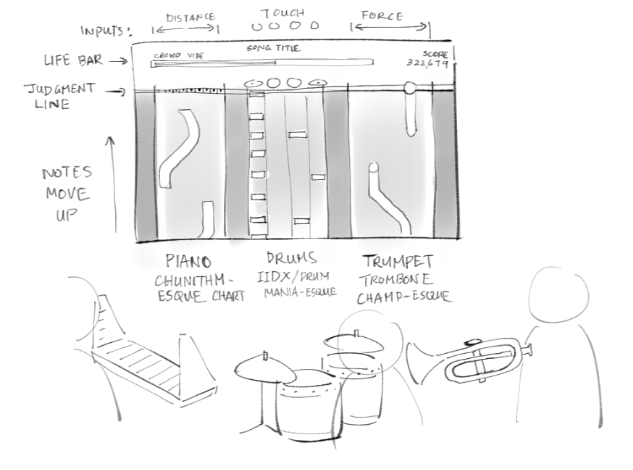
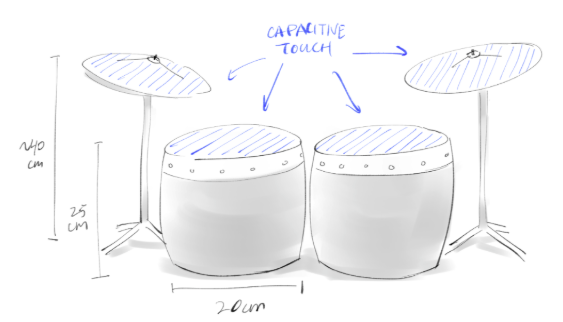
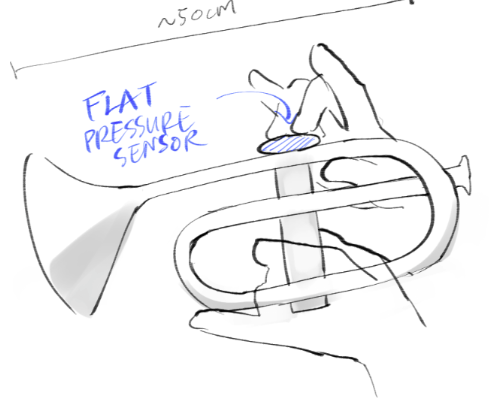
Creating the Charts
Building a level editor would have taken too much time within the project’s short schedule. Instead, I programmed the game to read .osu files, allowing me to create the levels using osu!’s existing editor. It made chart creation much faster and let me quickly create an easy/normal/hard difficulty for each instrument.
Keeping Notes in Time
One challenge was ensuring notes arrived at the correct time. My initial approach spawned notes through a sequence of delays, but frame rounding caused timing errors to accumulate and caused the notes to drift out of sync.
I changed the system to check each note’s timestamp against a shared running timer. When a note spawned slightly late due to frame rounding, the game calculated the delay and adjusted its starting position forward to compensate. This fixed the timing errors caused by spawning notes between frames.
Outcome & Reflection
Over a few weeks, we brought the physical controllers, interactive music, and Unity gameplay together into a playable prototype. The final game contained the core mechanics and game loop, with three difficulty levels for each instrument.
With more time, I would prioritize more visual feedback to react to the player doing well. Since the game targets a casual audience, effects that make a good performance feel exciting would help communicate that the players are doing well.
More detailed timing feedback, such as early and late indicators, would also help players understand their inputs. These features fell outside the final scope, but would be useful additions if I were to develop the prototype further.
